


Screening
Screen stocks
Purpose: Find stocks matching my own criteria.
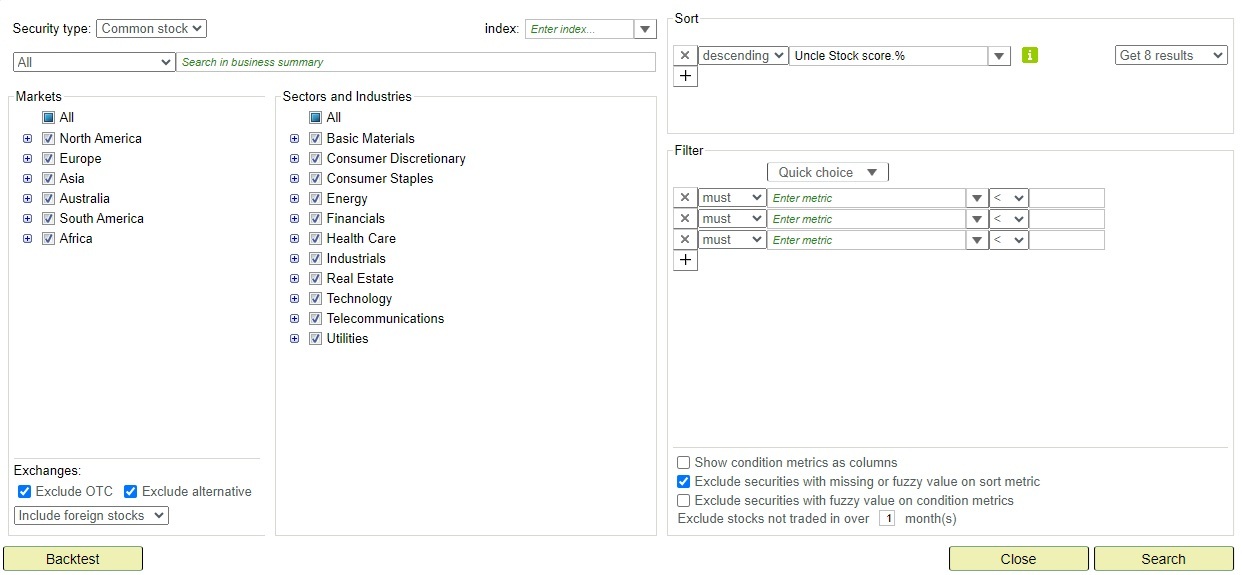
in the top menu always opens the query panel without any criteria — ready for a fresh search. When I'm standing on a query result and want to adjust the criteria, I click the Refine Query link on the result list (next to the Save/Update buttons). That opens the query panel pre-populated with the current query's criteria. If I started from a saved query of my own, the result tab is renamed to <query name> * to indicate it has unsaved refinements.
The query panel contains the following elements:
- Get top list sorted on: to define the metric to be used as ranking criterion.
-
Multiple sort criteria (composite ranking)
Besides sorting on a single metric, Uncle Stock also supports sorting on multiple criteria.- You can select several sort metrics at once.
- Only a curated set of metrics is available for multi-sort.
- Each selected metric is scaled to a 0–1 range across the result set.
- The scaled values are added together to form a composite score.
- Stocks are ranked by this composite score, highest first.
- As a result, no single metric dominates due to its unit or magnitude; each contributes proportionally.
-
Multiple sort criteria (composite ranking)
-
Criteria: to define a set of restricting criteria on metrics.
- To select a metric, type in the name, and Uncle Stock will hint the metrics, or select and use the tree view.
- Clause types:
- Must: condition is required for matching.
- Should: flexible matching. A stock has to meet at least two thirds of the “should” conditions, rounded down: 1 of 2, 2 of 3, 2 of 4, 3 of 5. If there are 2 or more, results are automatically ranked so stocks matching more “should” conditions appear first. A single “should” condition works like a “must”.
- Exclude: exclude stocks that match this condition. Also allows including stocks with missing values.
-
Index: specify the code of an index. The query will look for stocks that are components of the index.
Only indexes listed in the assistant are supported. Don't use the ^ symbol.
Examples: GSPC (S&P500), RUT (Russell 2000), STOXX (Stoxx 600), FTLC (FTSE 350).
- To search within multiple indexes, see example below (All:).
-
Full text search: top left of the search dialog, provide a query expression to filter on the business summary, industry, country, or exchange of the company.
- It's possible to use AND, OR, and NOT operators.
- Remark: Location, Business summary, Institutional holders, or Mutual fund holders can be selected for convenience, but with less flexibility.
- Examples:
- All: 3D printing Nasdaq
- All: dividendPayDate > 2019-3-1 AND dividendPayDate < 2019-3-31
- All: resultsAsOf < 2019-10-1
- All: NOT ipo > 2023-01-1
- All: msQuarterDate < 2019-10-1
- All: date < 2019-10-1
- All: China OR "Hong Kong"
- All: splits: 0
- All: splitsCount < 2
- All: startDate < 2015-01-1
- All: numberOfYears > 10
- All: indexSymbol: (GSPC OR STOXX OR FTLC)
- All: symbol: (AAPL OR ...)
- All: NOT symbol: (ALALO.PA OR ...)
- All: currency: GBX
- All: resultsAsOf > 2022-06-30 AND location: NOT China AND summary: "natural gas"
- All: industry: "Oil, Gas Consumable Fuels"
- Location: China
- Location: "United States"
- Location: "Cupertino, CA, United States"
- Location: CA AND "United States"
- Business summary: gold OR silver OR platinum
- Business summary: fintech OR (financial AND technology)
- Business summary: (gold OR silver OR platinum) AND "TSX Venture Exchange"
- Business summary: NOT China
- Business summary: NOT acquiring AND NOT portfolio
- Business summary: NOT LP AND NOT L.P. AND NOT partnership
- Top institutional holders: "Berkshire Hathaway"
- Top institutional holders: Mawer
- Markets filter: select continents or countries for filtering on the country of the stock exchange. Consider using the Business filter to query business location.
- Sectors, industry groups, and Industries filter.
Remark: NOT clauses will slow down your query (and backtest).
After defining or adjusting the query, click Search to run it. The result will open in a new tab. From there, you can:
- Use More stocks... to get the next set of search results.
- Export to .csv using the Excel icon at the top right of the result list.
- Backtest the query to simulate its historical performance.
- Use Refine Query to adjust the criteria of the query and re-run it.
- Use Save Query to save the query for future use. See the Manage queries page for details on updating an existing saved query.
Tip: Stocks you marked with the Never invest judgement are automatically hidden from screen and search results, so you don't keep running into companies you've already ruled out. They still appear in your watchlists and portfolios, flagged in the Classification column. You set the judgement on the stock analysis page. To review them all in one place, open Never invest under My stock lists (it appears below Stocks with notifications once you have such stocks).
Backtest
Purpose: Gauge the effectiveness of a query.

Backtest will run a backtest on the query at hand.
Backtesting is process of testing an investment strategy on prior time periods. Uncle Stock makes a simulation of the query on relevant past data in order to gauge its effectiveness. More information on the backtest options can be found here.
Remark: if the query was already backtested by another user, Uncle Stock will immediately show its result.
Use  to view the details of the backtest result.
The yearly return is calculated as ((1 + total price return) to the power of (1 ÷ period)) - 1, where period is in years.
There is a comparison with the S&P500. All returns are adjusted for dividends, but not for inflation.
to view the details of the backtest result.
The yearly return is calculated as ((1 + total price return) to the power of (1 ÷ period)) - 1, where period is in years.
There is a comparison with the S&P500. All returns are adjusted for dividends, but not for inflation.
Tip: Use Refine Query on the result list to try improving the criteria.
Next lesson: Manage queries