


Screening
Buscar acciones
Propósito:Encontrar acciones que coincidan con mis propios criterios.
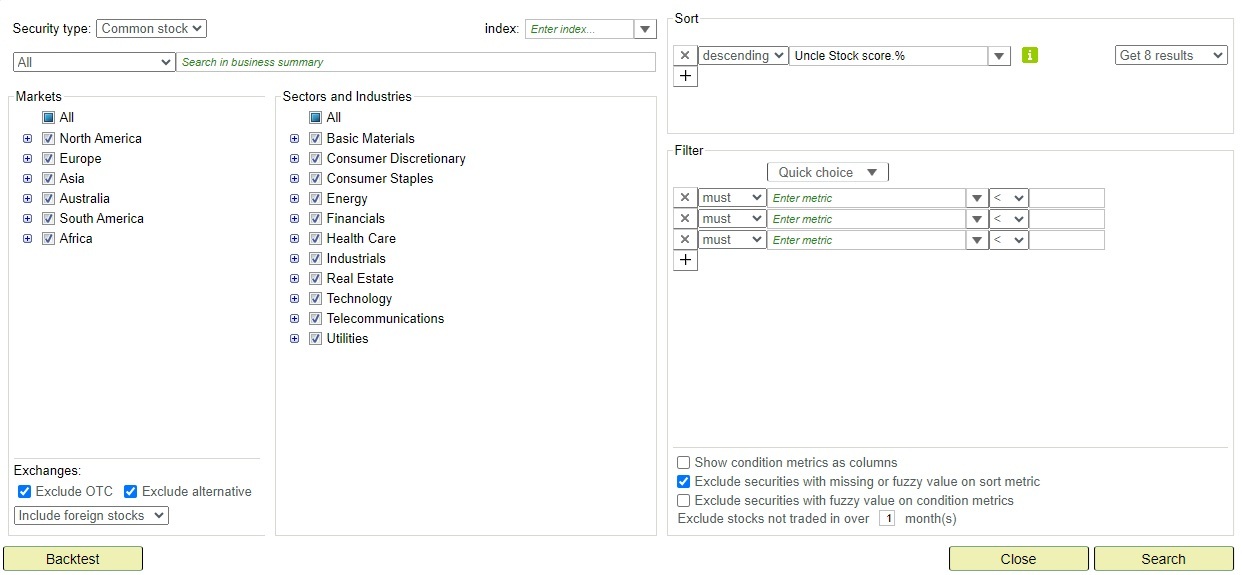
en el menú superior siempre abre un panel de consulta vacío — listo para una nueva búsqueda. Cuando estoy viendo un resultado de consulta y quiero ajustar los criterios, hago clic en el enlace Redefinir consulta en la lista de resultados (junto a los botones Guardar/Actualizar). Eso abre el panel de consulta con los criterios actuales pre-rellenados. Si partí de una consulta guardada propia, la pestaña de resultados se renombra a <nombre de consulta> * para indicar que tiene cambios sin guardar.
El panel de consulta contiene los siguientes elementos:
- Obtener la lista top ordenada por: para definir la puntuación o ratio que se usará como criterio de ranking.
- Criterios: para definir un conjunto de criterios restrictivos sobre las métricas. Para seleccionar una métrica, escribe el nombre y Uncle sugerirá métricas, o selecciónala usando la vista de árbol.
- Texto: proporciona una expresión de consulta para filtrar por el resumen comercial o industria de la empresa, o por el país o bolsa de la acción.
Es posible usar los operadores AND, OR y NOT. Usar un espacio en blanco es casi lo mismo que usar AND. leer más.
Observa que la ubicación, el resumen comercial, los titulares institucionales o los titulares de fondos mutuos se pueden seleccionar por conveniencia, pero con menos flexibilidad.
Algunos ejemplos:- All: 3D printing Nasdaq
- All: dividendPayDate > 2019-3-1 AND dividendPayDate < 2019-3-31
- All: resultsAsOf < 2019-10-1
- All: msQuarterDate < 2019-10-1
- All: date < 2019-10-1
- All: China OR "Hong Kong"
- Location: China
- Location: "United States"
- Location: "Cupertino, CA, United States"
- Location: CA AND "United States"
- Business summary: gold OR silver OR platinum
- Business summary: fintech OR (financial AND technology)
- Business summary: (gold OR silver OR platinum) AND "TSX Venture Exchange"
- Business summary: NOT China
- Business summary: NOT acquiring AND NOT portfolio
- Top institutional holders: "Berkshire Hathaway"
- Top institutional holders: Mawer
- Indexes: "GSPC"
- Indexes: "STOXX"
- Filtro de mercados. Selecciona continentes o países para filtrar por el país de la bolsa en la que cotiza la acción. Nota: considera usar el filtro Business para consultar la ubicación del negocio.
- Filtro de sectores, grupos de industria e industrias.
Nota:Las cláusulas NOT ralentizarán tu consulta (y el backtest).
Tras definir o ajustar la consulta, haz clic en Buscar para ejecutarla. El resultado se abre en una nueva pestaña. A partir de ahí puedo:
- Usar Más acciones... para obtener el siguiente conjunto de resultados.
- Exportar a .csv usando el icono de Excel, arriba a la derecha de la lista de resultados.
- Hacer un Backtest de la consulta para simular su rendimiento histórico. (ver Backtest)
- Usar Redefinir consulta para ajustar los criterios y volver a ejecutar.
- Usar Guardar consulta para guardar la consulta para uso futuro. Consulta Gestionar consultas para los detalles sobre cómo actualizar una consulta guardada existente.
Consejo: Las acciones que marcaste con el juicio Nunca invertir se ocultan automáticamente de los resultados de búsqueda y de screening, para que no vuelvas a encontrarte con empresas que ya descartaste. Siguen apareciendo en tus listas de seguimiento y carteras, señaladas en la columna Clasificación. El juicio se establece en la página analizar una acción. Para revisarlas todas juntas, abre Nunca invertir en Mis listas de acciones (aparece debajo de Acciones con notificaciones cuando tienes ese tipo de acciones).
Consejo:Para que tu consulta (y backtest) se ejecuten más rápido, defínela de la forma más restrictiva posible. El número de resultados se muestra encima del resultado de la búsqueda. Este número siempre debe ser inferior a 10.000. Por ejemplo, al ordenar por la puntuación Uncle Stock, añade una condición de filtro para seleccionar solo acciones con puntuación Uncle Stock > 80%.
Backtest
Propósito: Medir la efectividad de una consulta.

Backtest ejecutará un backtest rápido sobre la consulta en curso.
Backtesting es el proceso de probar una estrategia de inversión en períodos de tiempo anteriores. El tío Stock hace una simulación de la consulta sobre datos pasados relevantes para medir su efectividad. Hay varias opciones:
- Número de acciones define el número máximo de acciones que se seleccionarán en cada período.
- Tiempo de reequilibrio define el período de mantenimiento de las acciones y los momentos de reequilibrio. El momento más óptimo para la medición es comenzar Q2.
- Early sell se utiliza para definir la toma de ganancias o un stop loss.
- La estrategia de reequilibrio proporciona algunos indicadores técnicos que se pueden utilizar para decidir automáticamente no vender algunas acciones al final de un período y conservarlas para el siguiente. Por ejemplo, "Keep 20% from top" significa que las acciones que tienen un precio de período que finaliza por encima del 20% desde el tope del período no se venden y conservan para el próximo período de prueba. Por lo tanto, todas las acciones con precio al final del período por debajo del 20% desde la parte superior del período se venden y se reemplazan por otras nuevas seleccionadas.
- El Tamaño de posición se usa para decidir qué se debe hacer si no se encuentran suficientes existencias al comienzo del período. La posición máxima solo tomará una posición más grande en las acciones encontradas. La posición igual tendrá una posición igual en acciones durante todos los períodos y mantendrá el exceso de efectivo en efectivo o en fondos del mercado monetario. La ponderación de la volatilidad tomará posiciones más grandes en acciones menos volátiles, tratando de hacer que todas las posiciones tengan el mismo riesgo.
- También es posible comparar el resultado del backtest con una lista de índices (lista de símbolos separados por comas). La lista de índices disponibles se puede encontrar aquí. Ejemplo: use GSPC,STOXX para comparar con S&P 500 y Europe Stoxx 600.
Nota: si la consulta ya fue testeada por otro usuario, Uncle mostrará su resultado de inmediato.
Usa  para ver los detalles del resultado del backtest.
La rentabilidad anual se calcula como ((1 + rendimiento total del precio) elevado a (1 ÷ período)) - 1, donde el período es en años.
Hay una comparación con el S&P500. Todos los rendimientos se ajustan por dividendos, pero no por inflación.
para ver los detalles del resultado del backtest.
La rentabilidad anual se calcula como ((1 + rendimiento total del precio) elevado a (1 ÷ período)) - 1, donde el período es en años.
Hay una comparación con el S&P500. Todos los rendimientos se ajustan por dividendos, pero no por inflación.
Consejo: Usa Redefinir consulta en la lista de resultados para tratar de mejorar los criterios.
Siguiente lección:Gestionar consultas