
Lesson 5
Screen the market
By the end of this lesson you can ask the whole market a question — which companies look like this — and get a ranked answer.
A screen has two halves, and keeping them apart is the whole skill. Conditions decide who is allowed in the room. The sort decides who stands at the front. Beginners tend to write ten conditions and no sort, and get a list of forty companies in no particular order. Two conditions and a good ranking is almost always the better screen.
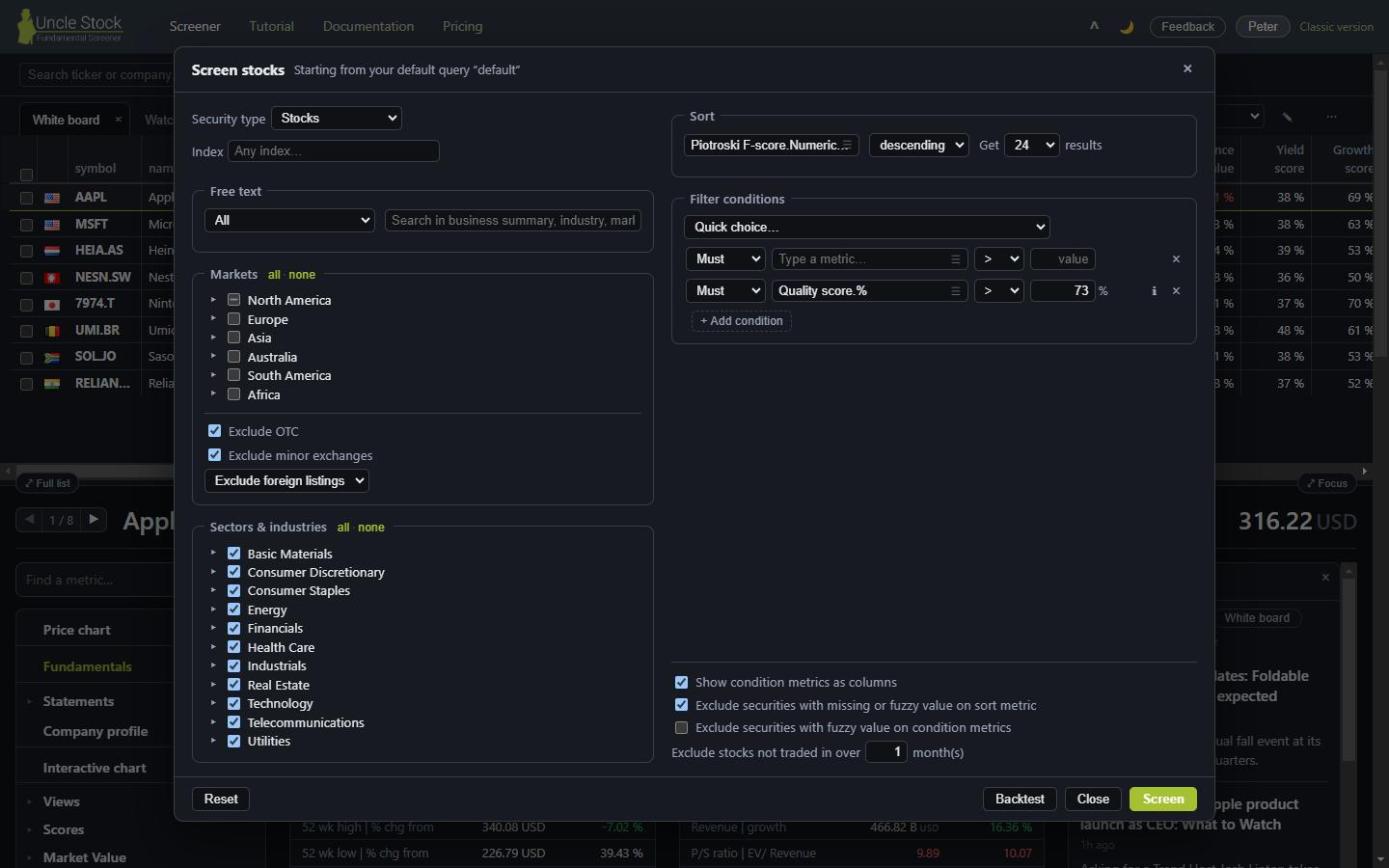
Open the screener1Where to start it
⚙ Screen stocks always begins a new screen, from your default query. It does not pick up whatever is on the table.
To change the screen you are looking at, use Refine query above the result instead — that is lesson 6. Getting these two mixed up is the single most common misstep in the screener.
 1
2
3
4
5
6
1
2
3
4
5
6
- Security type and index
- Free text
- Markets, Sectors & industries
- Sort
- Filter conditions
- The clean-up options
2Sort: what puts a company at the top
Pick the metric to rank on, choose descending or ascending, and say how many results you want back.
The direction is worth a thought. Uncle Stock asks for a direction rather than for “best first”, because best depends on the metric: high is good for return on equity and bad for price-to-earnings. Say which end you want and there is nothing to guess.
If you have no strong opinion, leave the sort on the Uncle Stock score. It already combines profitability, growth, solvency and valuation, so your conditions can stay about the one thing you actually care about.
Ranking on more than one metric Silver
+ Add sort criterion puts a then by row under the sort metric. It is not a tie-breaker: the companies are ranked on the sum of the criteria, so “Uncle Stock score, then by Greenblatt score” asks for the companies that do well on both — not for the score list with its ties broken by Greenblatt.
That sum is also why the metric list gets shorter as soon as you add a row. Two metrics can only be added together once they are on the same scale, and only a handful carry such a normalized value: the scores, plus Beta, EBIT yield, Free Cash Flow yield on Enterprise Value, Economic spread, Return on Capital Employed and the one-year price change. The first criterion joins that shorter list too, so if it was something else, it goes back to the Uncle Stock score and you pick again.
One direction applies to the whole ranking, so the further rows follow the first one's and state it instead of offering a second choice. The × beside a row removes it; remove them all and the first criterion is free to be any metric again.
3Conditions
A condition is a metric, an operator and a value. You get three empty rows to start with, and a fourth appears as soon as you fill the third — a screener is for stacking criteria, and an empty row should not be something you have to ask for.
Type the value in the metric's own unit. If the box shows a
% after it, then 10 means ten percent. If it shows an M, then
2000 means two billion. Uncle Stock converts behind the scenes — you never type
0.10 or 2000000000.
Two small marks sit beside each condition row:
- ℹ explains what the metric means, without leaving the dialog.
- ⚠ means the metric is fine to screen on but is left out of a backtest — useful to know before you build a strategy around it.
Quick choice
The Quick choice… list above the conditions appends a ready-made set of them in one go. It is the fastest way to see how an experienced screen is put together: append one, then take it apart.
4Must, Should and Exclude
Every condition carries a strength, and the difference between them is what makes this a screener rather than a filter.
| Strength | What it does |
|---|---|
| Must | A hard requirement. Fail it and the company is out. |
| Should Silver | A wish. A company has to meet two thirds of them, rounded down (2 of 3, 3 of 5), rather than all of them, and the companies meeting more of them rise to the top. A single Should on its own works like a Must. |
| Exclude | Throws out whatever matches. It can also keep companies whose value is simply missing, which a Must would silently drop. |
Should is the answer to the screen that returns nothing. Five Must conditions describe a company that may not exist; five Should conditions describe one you would like: any company meeting three of them qualifies, and the closest come first.
5The universe
The left half of the dialog decides which companies are eligible at all.
- Security type — ordinary shares by default; crypto needs Gold.
-
Index — screen only within an index. Type
to find it, and leave the
^off:GSPCfor the S&P 500,RUTfor the Russell 2000,STOXXfor the Stoxx 600. - Markets — continent, then country, then exchange.
- Sectors & industries — sector, then industry group, then industry.
Both trees work the same way: ticking a branch screens on that level, so everything under it is covered and greys out. Tick nothing and nothing is restricted — an empty tree means the whole world, not an empty world. Each tree has all and none beside its title; the useful one is none, to clear the tree before ticking the two industries you want.
6Free text
This searches the words around a company rather than its numbers: the business summary, its location, its exchange, its industry. It is how you find a theme that no metric captures.
Choose a field or leave it on all of them, then write an expression. AND,
OR and NOT all work, quotes hold a phrase together, and brackets
group.
| Expression | Finds |
|---|---|
gold OR silver OR platinum | Precious-metal companies. |
fintech OR (financial AND technology) | The theme, however the company words it. |
"natural gas" AND NOT China | A phrase, minus a country. |
Location: "United States" | One field only. |
industry: "Oil, Gas Consumable Fuels" | An exact industry name. |
indexSymbol: (GSPC OR STOXX OR FTLC) | Several indexes at once. |
symbol: (AAPL OR MSFT OR NVDA) | A hand-picked set. |
numberOfYears > 10 | Companies with a long enough history to judge. |
resultsAsOf > 2025-06-30 | Only companies that have reported recently. |
NOT ipo > 2023-01-01 | Nothing that listed in the last couple of years. |
currency: GBX | Shares quoted in pence. |
NOT LP AND NOT partnership | Drops partnerships, whose accounts do not compare. |
7Cleaning up the result
Four options under the conditions decide what a result is allowed to contain. The defaults are sensible; these are the reasons to change them.
- Exclude securities with missing or fuzzy value on sort metric — on by default. Without it a company with no value for the metric you rank on can still turn up in the ranking.
- Exclude securities with fuzzy value on condition metrics — the stricter cousin. Turn it on when you want only companies whose figures are solid enough to be sure they passed.
- Exclude stocks not traded in over N month(s) — drops the ones you could not actually buy.
- Show condition metrics as columns Gold — puts the metrics you filtered on into the result table, so you can see how close each company came.
Above them sit the listing options: OTC is excluded by default, and you can include, exclude or show only foreign listings — the secondary listings of a company whose home market is elsewhere.

8Search
The result opens as its own tab, marked ⚙ My screen. It behaves like any other list: pick a view, sort it, select rows, open a company below it.
A screen you cannot keep is a screen you will rebuild from memory next month. The next lesson saves it, improves it, and measures it.